
YAML Metadata Warning:empty or missing yaml metadata in repo card
Check out the documentation for more information.
Vocabulary Trimmed cardiffnlp/xlm-v-base-tweet-sentiment-it: vocabtrimmer/xlm-v-base-tweet-sentiment-it-trimmed-it-5000
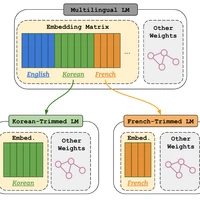
This model is a trimmed version of cardiffnlp/xlm-v-base-tweet-sentiment-it by vocabtrimmer, a tool for trimming vocabulary of language models to compress the model size.
Following table shows a summary of the trimming process.
| cardiffnlp/xlm-v-base-tweet-sentiment-it | vocabtrimmer/xlm-v-base-tweet-sentiment-it-trimmed-it-5000 | |
|---|---|---|
| parameter_size_full | 778,495,491 | 89,885,955 |
| parameter_size_embedding | 692,451,072 | 3,841,536 |
| vocab_size | 901,629 | 5,002 |
| compression_rate_full | 100.0 | 11.55 |
| compression_rate_embedding | 100.0 | 0.55 |
Following table shows the parameter used to trim vocabulary.
| language | dataset | dataset_column | dataset_name | dataset_split | target_vocab_size | min_frequency |
|---|---|---|---|---|---|---|
| it | vocabtrimmer/mc4_validation | text | it | validation | 5000 | 2 |
- Downloads last month
- 5